The Browser and the Web
What happens between typing a URL and seeing a page, and how does it fit in 16.7 milliseconds a frame?
The part opens by typing an address and pressing enter: the name is resolved, a connection opens, HTML arrives, and then the browser's own work begins. A browser is five machines in one program, and the part builds each small enough to read. The HTML tokenizer is a state machine that never rejects its input, and the tree builder repairs six malformed documents with a stack of open elements. The cascade picks a style by specificity, a lexicographic order on three counts, and matches selectors right to left. Layout distributes free space with flexbox and breaks paragraphs into lines, where Knuth and Plass's dynamic program beats the greedy rule on Darcy's letter in Pride and Prejudice. One event loop schedules tasks, microtasks and rendering into frames of 16.7 ms: a 120 ms task drops seven of them, and the same work in 8 ms chunks drops none. The part then covers JavaScript engines, virtual-DOM diffing, caches, Core Web Vitals, the same-origin security model and the WCAG contrast ratio, and runs the pieces together as a toy browser that renders the series' own README. It ends at the frontier: nested intrinsic sizing that costs 2,097,151 layouts at depth 20 without a cache and 41 with one, layout checked by solvers, and formal models of web security.
What you need. Enough HTML, CSS and JavaScript to read a short page; no web framework is assumed.
- Mathematics, ideas and history
- the HTML tokenizer, the cascade, flexbox and Knuth–Plass line breaking, compositing and the frame budget, the event loop, JS engines, virtual-DOM diffing, Core Web Vitals, the browser security model, accessibility, mobile
- What we build or compute
- a toy browser rendering this README
What you will be able to do
Degree
- Trace a page load from the URL to pixels, naming the parser, the cascade, layout, paint and the event loop.
- Compute a selector's specificity and decide which of two rules wins.
- Predict the output order of a script that mixes setTimeout, promises and await.
Graduate
- Implement Knuth-Plass line breaking by dynamic programming and prove it optimal for an additive cost.
- Run the flexbox grow and shrink algorithm by hand on three items.
- Explain hidden classes and inline caches, and why a megamorphic call site is slow.
Research
- Explain why nested intrinsic sizing costs 2^(d+1) - 1 layouts without a cache, and state the open problem of relayout bounded by the size of a change.
- Describe what Cassius and the formal web-security models prove, and what they leave out.
Industry
- Find the long task behind a dropped frame and split it into chunks that fit the frame budget.
- Give list rows stable keys, and say what breaks without them.
- Check a colour pair against the WCAG contrast thresholds of 4.5 and 3.
Contents
Each chapter has a home level. Choose a track to see what to read and watch: Degree 24 min · Graduate 50 min · Research 52 min · Industry 34 min.
- 0What happens when you type a URLDegree3 min
- 1Thirty years of the webDegree3 min
- 2Parsing HTMLDegree4 min
- 3The cascadeDegree4 min
- 4LayoutDegree4 min
- 5Paint, layers and the frameGraduate4 min
- 6The event loopDegree4 min
- 7JavaScript enginesGraduate3 min
- 8UI frameworksGraduate4 min
- 9Caches, offline and local-firstIndustry3 min
- 10Web performanceIndustry3 min
- 11The security modelGraduate4 min
- 12Accessibility and mobileIndustry3 min
- 13Our toy browserGraduate3 min
- 14Frontier: layout, engines and proofsResearch2 min
- Recap, problems, and where this comes backAll tracks3 min
Also on this page: Lecture · Key results · Try it · Lab · Problems · Notes and sources · 中文 · Build the film.
Lecture
The text of each chapter is the film's narration, as it is spoken, so you can read along or revise without the film. The pictures are in the film.
What happens when you type a URLDegree3 min
Type an address into a browser and press enter. In a few hundred milliseconds, a page appears. Between the key press and the pixels, almost everything this series has built takes a turn. The name is resolved by the domain name system of Part 36. A TCP connection is opened, and a TLS handshake agrees keys with the public-key cryptography of Part 30. The request goes out, and the first bytes of HTML come back over the transport protocols of Part 37. Then the browser's own work begins. It parses the HTML while it is still arriving, discovers stylesheets and scripts and fetches them in parallel, computes the style of every element, lays out the page, and paints it. That last stretch, from bytes to pixels, is this part's subject: what a browser does with a page once it has one.
A browser is several machines in one program. It is a parser that never rejects its input: every sequence of bytes, however broken, becomes a document tree. It is a constraint solver, fitting boxes, lines of text and free space together. It is a graphics compositor, moving and blending layers on the GPU sixty or a hundred and twenty times a second. It is a just-in-time compiler that makes untrusted code fast, and an operating system that keeps that code in a sandbox. And one event loop holds it all together, with a deadline: at sixty frames a second, everything for the next frame has to fit in sixteen point seven milliseconds.
We will build each stage, small enough to read, and at the end run them together as a toy browser. Here is its output: the top of this series' own README. The Markdown becomes HTML; a tokenizer and a tree builder turn the HTML into a tree of 146 nodes; the cascade gives every element a style; layout breaks the text into lines and stacks the blocks; and a painter draws the words with real fonts into real pixels. It is missing almost everything a real browser has. But each piece does what the real piece does, and it shows the shape of the problem.
1Thirty years of the webDegree3 min
In March 1989 Tim Berners-Lee, at CERN, proposed keeping track of the laboratory's information as documents linked to one another. His supervisor wrote on the cover: vague, but exciting. By the end of 1990 he had built the three pieces still underneath every page: a name for any document, which became the URL; a protocol for fetching it, HTTP; and a format with links, HTML. He wrote the first browser, called WorldWideWeb, on a NeXT computer, and the first server. In August 1991 he announced the project to the world.
The web spread when it became pleasant to look at. In 1993 Marc Andreessen and Eric Bina, at the National Center for Supercomputing Applications, released Mosaic, whose image tag put pictures in the page itself, among the words. That April, CERN put the web's software in the public domain. In 1994 Andreessen co-founded Netscape, whose Navigator soon dominated, and Berners-Lee founded the World Wide Web Consortium, the W3C, to write the standards.
Two more languages joined HTML. In October 1994 Håkon Wium Lie proposed cascading style sheets, so that how a page looks could be written apart from what it says. CSS level one became a W3C recommendation in December 1996. In May 1995, at Netscape, Brendan Eich wrote the first JavaScript in about ten days. It was standardized as ECMAScript in 1997, and some of its hasty decisions are with us still. Microsoft answered with Internet Explorer, bundled with Windows. In the browser wars each side invented its own tags, and by the early two-thousands Internet Explorer had most of the market, and its development slowed.
The next leap came from a feature that almost nobody noticed. A classic page asks the server for a whole new page on every click. In 1999 Internet Explorer 5 shipped an object that let a script fetch data without leaving the page, and other browsers copied it as XMLHttpRequest. Now a page could stay put and fetch small pieces of data in the background. Gmail in 2004 and Google Maps in 2005 showed what that allowed, and in February 2005 Jesse James Garrett named the technique Ajax, for asynchronous JavaScript and XML.
2Parsing HTMLDegree4 min
An HTML parser has two stages. The first, the tokenizer, is a finite automaton like those of Part 12, reading one character at a time. Here it reads a paragraph with a class, a word, and a bold word that is never closed. In the data state, characters are text. A less-than sign moves it to tag open, a letter to tag name, a space to the attributes, an equals sign to a value, and each greater-than sign back to data, emitting a token. Out come five tokens. Nothing here can fail: an unexpected character has a transition too, written down by the standard, whose tokenizer has about eighty states.
The second stage, the tree builder, keeps a stack of open elements, the memory that Part 12 added to automata to handle nesting. A start tag creates an element, attaches it to the element on top of the stack, and pushes it; text is attached to the top. Then the paragraph's end tag arrives while bold is still open. A grammar would reject the input here. The tree builder pops bold too, closing it for the author, and then the paragraph. What remains is the DOM, the document object model: a tree of node objects that scripts read and change, and that everything else in this part works from.
Most of the tree builder's rules close elements the author left open. A paragraph cannot contain a paragraph, so a p start tag closes the open p, and the two become siblings. A list item closes the previous item, and the end of the list closes the last one. An end tag closes everything above its match on the stack: the end of the table ends the cell and the row too. A real browser also inserts a table body element here, which our simplified parser leaves out. The standard writes all of these rules down.
Misnested tags are harder. Here bold opens, then italic, but bold closes first. Our tree builder closes the italic along with the bold, then opens a new italic element, so the last words stay italic, as the author meant: a simplified case of the standard's adoption agency algorithm. An end tag with nothing to match, like this stray span, is ignored. And a less-than sign that does not begin a tag is a parse error with a defined outcome: it is text. Every input gives a tree, and every browser that follows the standard gives the same one.
So why not write a grammar for HTML, and use the parsers of Parts 12 and 13? A parser built from a grammar also answers yes or no: input outside the language is a syntax error, and a compiler stops. A browser cannot stop. Real pages are full of errors, and a reader blames the browser that shows nothing. So the standard defines HTML by its parsing algorithm: a tokenizer of about eighty states, and a tree builder whose every step depends on its stack and on an insertion mode, such as in body or in table. Nor is the input fixed. A script running in the middle of parsing can call document dot write and insert new characters right after itself, so the parser must pause, run the script, and carry on.
3The cascadeDegree4 min
When rules disagree about a property, the cascade decides which one wins, and its best-known tool is specificity. A selector's specificity is three counts: its ids, its classes, and its tag names. Here are ten selectors, weakest first. The counts are compared like words in a dictionary: ids first, classes only if the ids tie, tags last. So one id beats any number of classes. When two selectors tie exactly, like p dot lead and dot note p, the later rule wins.
Specificity is only part of the cascade's sort key. First comes origin and importance: the browser's defaults, then the user's style sheet, then the author's, with important declarations in reverse, so a user's important preferences beat the page. Then specificity, with a style attribute beating every selector. Then order of appearance. Sort every matching declaration by that key, and the last one wins. Cascade layers, in browsers since 2022, add a step, but not a new idea.
Now a small page with four rules. Four selectors match the paragraph of class lead. Sorted by specificity, then by order, three of them set its colour, and the last, the one with an id, wins. So the paragraph is green, and from p dot lead it takes a font size of eighteen pixels. The bold element inside matches no rule, but colour and font size are inherited: with no value of its own, an element takes its parent's, so the bold word is green too. The plain paragraph matches only p, and is grey.
The DOM says what the page contains, and the parsed style sheets form the CSS object model, the CSSOM. Matching one against the other gives every element its computed style, and the result is the render tree, which Chrome now calls the layout tree: one entry for each element that will be drawn. An element with display none gets no entry, and a pseudo-element such as before gets one that the DOM lacks. Layout works on this tree.
Matching rules to elements is the expensive part of style, and browsers do it backwards. To test div dot nav a against a link, start at the right: is this element an a? Yes. Then walk up its ancestors for one of class nav, and above that, a div. Most elements fail the first test. Left to right would start from every div and search everything below it. On a synthetic page of two thousand elements, with a mean depth of about 21, our ten selectors cost about 34 thousand element tests right to left, against 119 thousand left to right. On this series' shallow README the two are about equal, and left to right is even slightly cheaper: depth makes the difference.
Most of those tests are never made, thanks to Part 17's hash maps. Each rule is filed under the rightmost part of its selector: its id, or else a class, or else its tag. To style a paragraph of class lead, look up only the buckets for p, for lead, and for the universal selector: six of these ten rules are tried, and the other four are never looked at. Engines also keep a Bloom filter, from Part 20, of the ancestors' ids, classes and tags, so a selector needing an ancestor of class nav is often rejected at once.
4LayoutDegree4 min
Layout gives every element a box: where it goes, and how big it is. A box is its content, then padding, a border, and a margin that keeps neighbours away. In normal flow, blocks stack down the page, each as wide as its container: widths flow down the tree, heights come back up. Inside a block, inline boxes flow along a line and wrap into the next line box.
Flexbox shares out space. Three items with bases of one hundred and twenty, two hundred and one hundred and sixty pixels, and grow factors of one, two and zero, fill four hundred and eighty pixels. At seven hundred and twenty, two hundred and forty pixels are free: one share to the first, two to the second, none to the third. At eight hundred and eighty, four hundred are shared the same way. At three hundred and sixty, a hundred and twenty are missing, taken in proportion to shrink factor times basis, so the widest gives up most. At three hundred, each loses three eighths. Items that hit a size limit are frozen, and the rest share again.
Grid is the two-dimensional version. Columns and rows are tracks, and items span the grid lines between them. A track can be fixed, or a fraction of what is left: in eight hundred pixels, a fixed two hundred leaves six hundred, so one fraction is two hundred. Rows and columns are sized together, so items line up both ways.
How should a paragraph break into lines? The greedy rule, which browsers have traditionally used, puts each word on the current line if it fits. Here is Darcy's letter from Pride and Prejudice at three hundred and sixty pixels; red bars show each line's shortfall. Knuth and Plass, in 1981, for TeX, chose all the breaks at once, minimising the sum of the lines' cubed shortfalls. Both use seventeen lines and differ on three. Greedy's worst line is seventy-seven point eight pixels short, against fifty-four point eight, and badness falls from two point four to one point eight six. Over three hundred paragraphs of the novel, total fit wins on two hundred and eighty-four.
Knuth and Plass saw this as a graph. Put a node between every two words of the novel's opening sentence, and an edge wherever the words between two nodes fit on a line of one hundred and ninety pixels: eighty-seven edges, each weighted by its line's badness. The best paragraph is the cheapest path from first node to last, found by the dynamic programming of Part 19: the best cost to each node from the best costs before it. Its total is five point four one. Greedy squeezes that a onto line two and is left with a third line far too short: eight point five three. Locally best is globally worse.
Laying out the whole page on every change would waste the frame. So engines keep dirty bits: an edit marks its box, and a bit saying a child needs layout climbs to the root. Layout walks only the marked path. Editing one paragraph of our toy browser's README re-breaks its twenty-two words and moves the eleven blocks below; the rest of the seven hundred and eighty-six words are untouched. The catch: reading a size from script forces pending layout at once, so alternating reads and writes lays out the page again and again.
5Paint, layers and the frameGraduate4 min
With every box placed, the browser still has to make pixels, and it does so in a pipeline. Style computes the properties of every element. Layout places the boxes. Paint walks the box tree and records what to draw. Composite combines the results into a frame. Paint does not set pixels directly. It produces a display list, drawing commands in the order CSS defines: backgrounds and borders first, then text, then positioned elements by their stacking order. Turning that list into pixels, in tiles and usually on the graphics processor, is rasterisation, the subject of Part 51.
Browsers do not repaint the whole page for every change. They split it into layers: here the page, a header that stays put while the page scrolls, and a card being animated. Each layer is rastered once into a texture, and the compositor stacks the textures on the graphics processor. Animate a property such as width, and every frame goes through style, layout, paint and composite. Animate transform or opacity instead, and nothing about the boxes changes: the compositor just moves or fades a texture. It runs on its own thread, so such an animation keeps running even while a script is busy. Layers are not free, though: each is a texture in memory, and a page that asks for too many runs short.
All of this has a deadline. A sixty hertz display shows a new frame every sixteen point seven milliseconds; on a hundred and twenty hertz screen, every eight point three. Everything for a frame, scripts, style, layout and paint, has to fit in that window. In our simulator a frame's rendering step takes four milliseconds, leaving about twelve and a half for everything else. To animate in step with the display, a page asks for requestAnimationFrame. Its callback runs once, just before the next frame's style and layout, and receives that frame's time. A timer set to sixteen milliseconds drifts against the display instead, and the browser pauses animation frames in background tabs.
Here is our event-loop simulator running an animation: every frame, a three millisecond requestAnimationFrame callback, then style, layout and paint. At forty milliseconds a click arrives, and its handler does a hundred and twenty milliseconds of work in one task. A task runs to completion, and rendering cannot happen in the middle of one. So after frames sixteen point seven milliseconds apart comes a gap of a hundred and twenty-six point seven: seven frames dropped, and the animation visibly stutters. That stutter is jank. Now split the same work into chunks of eight milliseconds, each scheduling the next with setTimeout of zero. Between chunks the loop gets a chance to render. No frame is dropped, though some arrive a few milliseconds late. The price is throughput: the work finishes at a hundred and ninety-six milliseconds instead of a hundred and sixty. Browsers flag any task over fifty milliseconds as a long task, and a click during one waits too.
6The event loopDegree4 min
A web page's JavaScript runs on one thread, driven by a loop the HTML standard writes out step by step. Take one task from a task queue: a timer, a click, a network reply. Run it to completion; nothing interrupts it. Then drain the microtask queue, the reactions of promises, completely, including any microtasks queued while draining. Then, if a frame is due, run the rendering steps: animation frame callbacks, style, layout and paint. And go round again. Everything about ordering on the web follows from these four steps.
Watch the loop run four lines. The script itself is the first task, and goes on the call stack. It logs A. setTimeout, even with a delay of zero, puts a callback in the task queue, to run in some later task. A promise's then puts its callback in the microtask queue. The script logs D, and finishes; the stack is empty. Before any other task, the microtasks drain: C. Only then does the loop take the next task, and B is logged last. A, D, C, B: our interpreter computes this order from the processing model, and every browser agrees.
The same four steps settle harder cases, and our interpreter computes each one. Here two timers and a promise whose reaction queues another. The synchronous log comes first, then both promise reactions, because a microtask queued while draining still runs in the same drain. Then the first timer, whose own microtask runs before the second timer. An async function runs synchronously until its first await. The rest of it becomes a microtask, queued before the promise below, so f resumes before then. Finally a timer against an animation frame. In our model the next frame is sixteen point seven milliseconds away, so the timer runs first; in a real browser those two can come in either order, and code should never depend on it.
Run to completion is a strong guarantee. No two pieces of script ever run at once, so the JavaScript heap cannot have the data races of Part 33: no lock is ever needed. Promises and async functions are concurrency without threads, continuations the loop resumes later. But every await ends a piece. Two quick clicks each ask for the stock, each hear that one item is left, and each places an order: a logical race, with no threads at all. And the guarantee cuts the other way too. A piece that never ends blocks everything behind it, rendering and input included, which is the frozen page of the last chapter.
For work that really is long, a page can use more than one core. A Web Worker is a second thread with its own event loop and its own heap, and no access to the page. The two share nothing; they talk by posting messages, which arrive as tasks. The main thread sends the text, the worker counts it, and the counts come back, while the animation keeps its frames. A message is copied, or its buffer is transferred, leaving the sender with nothing. Shared memory with atomic operations exists too, only for pages isolated from other origins, and it brings the data races back.
7JavaScript enginesGraduate3 min
Then comes the pipeline Part 15 measured. Bytecode runs at once in an interpreter, which records what it sees: the types reaching each operation, the shapes reaching each property access. Hot functions move up, to a baseline compiler and then to an optimizing one, which specialises the code using that feedback, with a way back if its guesses fail. V8's tiers are Ignition, Sparkplug, Maglev and TurboFan; Firefox and Safari climb a similar ladder.
How can a property be found quickly, when any object can gain properties at any time? Every object points to a hidden class, a shape: a table of which property lives in which slot. Adding a property follows a shared transition to a new shape. a gains x, then y. b does the same, and lands on the very same shape. c adds y first, and ends on a different one. Part 15 asked V8 itself, and it agrees: same order, same shape.
A shape lets the engine skip the table. Each access in the code, like p dot x here, keeps a small cache: the shapes it has seen, and where x was. We summed p dot x over ten thousand objects. Built one way, the site is monomorphic: one shape check per access. With two or four property orders it is polymorphic, trying up to four cached shapes in turn, two and a half checks per access. With eight, the cache overflows and the site goes megamorphic: a dictionary lookup on every one of the ten thousand accesses.
The optimizer also bets on types. add is called three times with small integers, so it is compiled as one machine addition, guarded by checks that both arguments really are small integers. Call five passes a string. The guard fails, and the engine deoptimizes, rebuilding the interpreter's frame and carrying on there. At call eight, add is compiled again, for integers or strings. Call nine overflows a small integer: another deoptimization, and at call twelve a version wide enough for all three. Feedback only widens, so a function settles.
And all those objects need collecting, with Part 15's collectors. New objects fill one half of a small young generation. Most die young: a scavenge copies the few survivors to the other half, so its cost is the living, not the garbage. Objects that survive twice move to the old generation. That is collected rarely, by mark and compact, with the marking done concurrently on helper threads, so JavaScript sees only short pauses, often scheduled in idle time between frames.
8UI frameworksGraduate4 min
Keeping every element in step with the program's state by hand is where interface bugs live. React, released in 2013, made a different promise. Describe the page as a function of the state; when the state changes, call it again, and get a new tree of plain objects, a virtual DOM. Compare it with the previous tree. Here one row's text differs. The result is a patch, one text edit, and only that touches the real DOM, where every change can mean style, layout and paint again.
How should two trees be compared? Exactly, by tree edit distance: the fewest insertions, deletions and relabellings that turn one into the other. Zhang and Shasha's algorithm of 1989 is dynamic programming, as in Part 19, and general algorithms are still about cubic. On lists with one row changed, ours takes three hundred milliseconds at a hundred and twenty rows. React instead uses two rules: an element of a different type replaces its whole subtree, and children are matched by key or by position. That is linear, a third of a millisecond here, and it finds the same single edit.
Lists need help. Here are four rows, and the user has ticked b. Add a row at the top. Matched by position, old rows pair with new rows in order: every row's text is rewritten, a new element appears at the end, and the tick, which lives in the element, now sits beside a. Give each row a key, a stable identity: one new element at the top, the others untouched, and the tick stays with b. On a hundred rows, a prepend touches three nodes by key and a hundred and three by position, and a hundred rows end up with another row's state.
Keys say which rows survive, not how to move them. Swap the first and last of six rows. React walks the new order once, remembering the furthest old position placed so far. Row five comes first, so every later row, coming from further left, is moved: five moves. The fewest moves keep the longest run already in increasing order, one to four, and move only two. A longest increasing subsequence is a classic of Part 19, and Inferno and Vue 3 use it. On a hundred rows, reversing needs ninety-nine moves either way, but swapping two costs React's pass ninety-nine, against two: an honest weakness, rarely hit in practice.
Another family of frameworks skips the virtual tree. State lives in signals: a first name, a last name, a count. Computed values read them, and the header reads those; each read records an edge, so the framework knows the graph. Set count to three: only the badge and the header re-run. Set the last name: full name, greeting and header re-run, and the badge does not. It is Part 41's build graph, recomputed on every write, with its early cutoff: a value that comes out unchanged stops the wave. SolidJS works this way, and now so do Svelte, Vue, Preact and Angular.
9Caches, offline and local-firstIndustry3 min
The fastest request is the one never sent. With its answer, a server can say how long the answer stays good: max age sixty, fresh for a minute. It also sends an ETag, a name for this version. Twenty seconds later, the browser uses its copy without asking anyone. After a minute the copy is stale, but not useless. The browser asks again, sending the ETag. Nothing has changed, so the server answers three hundred and four, not modified: headers only, a round trip but no body.
Here one file is requested nine times in seven minutes, and changes at three hundred seconds. With max age sixty: a miss, then two fresh hits, then revalidations answered with three hundred and four, until three hundred and twenty, when the ETag no longer matches and the new body comes back. Seven of the nine requests waited on the network. Add stale while revalidate, a hundred and twenty seconds: a stale copy is served at once, and checked in the background. Only the first request waits. The price: at three hundred and twenty, the user sees the old version, once.
Build tools avoid that bet altogether. The page is revalidated every time, but the scripts and styles it names carry a hash of their content in the file name: Part 41's content addressing. One name means one set of bytes, so those files are cached for a year and marked immutable, never checked. Change a line, and the build emits a new name. The page points at it, the browser fetches that one file, and the old copy is simply never used again.
A service worker is a script the page installs between itself and the network. Every request the page makes, the worker sees first, and answers in ordinary JavaScript. Cache first: answer from the cache, and only on a miss go to the network, keeping a copy. That suits the app's own files, and lets it open with no connection at all. Network first: try the network, so the data is current, and when it is gone, fall back to the last copy. The page just keeps working.
Push this further, and the server stops being the home of the data. In 2019 Martin Kleppmann and his co-authors, with the research lab Ink and Switch, called it local-first software: your data lives on your own devices, opens instantly, works offline, and servers only help the devices sync. A shopping list on two devices, both offline. The phone adds milk; the laptop adds bread and ticks off eggs. Reconnected, each sends the other its operations. A CRDT from Part 39 merges them: its merge is commutative, associative and idempotent, so both reach the same list, whatever order the messages arrive in. Automerge and Yjs are libraries built for exactly this.
10Web performanceIndustry3 min
Before a page can show anything, the browser must fetch and process everything that blocks rendering. Here is one page as a dependency graph. The HTML arrives first. It names a stylesheet and a synchronous script, and the stylesheet names a font, so each fetch waits for the file that mentions it. First paint waits for all of them, and the longest chain, HTML, CSS, font, is the critical path: three hundred and forty-five milliseconds. It is Part 41's build graph, with time on the edges. Now defer the script, and preload the font from the HTML. The font starts a hundred milliseconds earlier, and first paint moves to two hundred and forty-five. Browsers also rank their fetches, stylesheets and fonts high, images low, and a page can raise the one image that matters most.
In 2020 Google named three Core Web Vitals, measured in real users' browsers. Largest Contentful Paint is the time until the biggest image or block of text is drawn; under two and a half seconds is good. Interaction to Next Paint is the delay from a tap or a key press to the next frame. In March 2024 it replaced First Input Delay, which timed only the wait before the first interaction began. Under two hundred milliseconds is good. Cumulative Layout Shift measures how much the page jumps while you read it; under a tenth is good. A page passes when three visits in four are good.
Layout shift has its own arithmetic. When a visible element moves, the shift scores its impact fraction, the share of the viewport it covers before and after, times its distance fraction, how far it moved. Here are five shifts in a page's first ten seconds. They are grouped into session windows, which close after a gap of a second, or after five seconds in all. Ours form three, worth point zero eight five, point one two five, and point zero zero two five. The score is the worst window, point one two five, which needs improvement. The usual culprits are images without a width and height, and late fonts and adverts.
Then the connection itself. HTTP one point one carries one request at a time per connection, so browsers opened about six connections to each host. HTTP/2, in 2015, multiplexes many streams over a single TCP connection, as interleaved frames. But TCP delivers bytes strictly in order, so when one packet is lost, every stream waits for its retransmission: head-of-line blocking, from Part 37. HTTP/3, standardised in 2022, runs over QUIC on UDP, which keeps order only within each stream. A loss now stalls only the stream it belongs to, and the handshake folds in TLS, from Part 30, saving a round trip.
11The security modelGraduate4 min
A browser runs code from every site you visit, so its first rule is about who may read what. An origin is three things: the scheme, the host and the port. The path does not count. Two pages share an origin only if all three match. Change https to http, add a port, or move to a subdomain, and they are strangers. A page may embed images, scripts and frames from anywhere, and send requests anywhere, but its scripts may read only what their own origin serves.
Reading across origins needs the server to opt in. The browser sends the request, but when the response returns, it looks for a header naming the page's origin. Without one, the script never sees it. Here are six requests from a shop's page, decided by our model of the rules. A plain GET is always sent, but readable only if the server allows us. A PUT or a custom header could do things an old server never expected, so the browser first asks permission with a preflight, and if refused, never sends the request. And a request with cookies must be allowed by name, not by a wildcard.
The commonest attack breaks no rule: it gets the attacker's code served from your origin. A page greets users by pasting their name into its HTML, and someone picks a name that is itself HTML. Our parser from Chapter 2 builds the tree, and beside the greeting is an image with an error handler. The image fails to load, the handler runs with the page's authority, and the cookies go wherever it sends them. This is cross-site scripting. Escape the name, so the angle brackets become character references, and the same parser makes one text node: shown, not run.
A Content Security Policy is the second line of defence. The server lists where scripts may come from, here only its own origin, and the browser refuses everything else: inline handlers like our injected one, and scripts from other origins. And marking the session cookie HttpOnly hides it from scripts altogether.
Cookies bring the opposite danger. The browser attaches a site's cookies to every request to that site, whoever starts it, so another site's page can submit a hidden form to your bank, which sees you signed in: cross-site request forgery. The SameSite attribute stops it. A Lax cookie crosses sites only when you follow a link at the top level; a Strict cookie never does. Since 2020, Chrome treats a cookie without the attribute as Lax.
Browsers split themselves into processes: a privileged browser process, and sandboxed renderers that run pages and cannot touch files or the network directly. In 2018, Spectre showed that speculative execution, from Part 8, lets a script read memory in its own process through cache timing, so an attacker's frame could read the page beside it. The answer was site isolation: each site gets its own renderer process, kept apart by the hardware's memory protection rather than the engine's checks.
12Accessibility and mobileIndustry3 min
A screen reader does not see pixels. From the DOM the browser derives a second tree, the accessibility tree, and hands it to the operating system: for everything a person can perceive or operate, a role, a name and a state. A button element becomes a button named Buy; a checkbox is named by its label, and is checked; an image is named by its alt text. But a div with a click handler is just generic text: nothing to press, and the keyboard cannot reach it.
Many people use only a keyboard. Tab moves the focus in the order of the DOM, not the order on screen, so a layout rearranged by CSS sends the focus jumping. ARIA attributes can repair the accessibility tree with a role, a name or a state, but the keys are then yours to handle. The first rule of ARIA is to prefer the native element, which brings it all for free.
Text must also be readable, and the Web Content Accessibility Guidelines, WCAG, make readable a number. sRGB values are gamma-encoded, so first undo it: a short straight piece near black, then a power of two point four. Weight the linear channels by how bright each primary looks, mostly green, to get the relative luminance. The contrast ratio is the lighter luminance plus five hundredths, over the darker plus five hundredths: one for equal colours, twenty-one for black on white. Our blue, on our background: point three seven against point zero zero eight six, a ratio of seven point one.
Normal text needs four and a half to one for level AA, large text three, and level AAA seven. On white, the lightest grey that passes AA is hex seven six seven six seven six. On our background, every colour of this series' palette but one passes AA, and four pass AAA. The darkest grey fails, at one point eight four. It should carry lines, not words, yet our own timeline strip prints its years in it: a fault this check has just found.
On a phone, the radio's cost depends on its state, not just on the bytes. In the LTE model measured by Huang and colleagues in 2012, waking the radio takes about a quarter of a second, and after a transfer it lingers in a high-power tail of about eleven and a half seconds. Ten small requests twenty seconds apart pay that tail ten times: about a hundred and thirty joules in our model. Sent together, they pay it once: about sixteen and a half joules, nearly eight times less. So phones batch background work.
13Our toy browserGraduate3 min
Here are the stages run on the README, one at a time. The source is Markdown, a few dozen lines of it. A converter of about fifty lines turns headings, lists, emphasis and code into HTML. The tokenizer of chapter two reads that HTML a character at a time, producing 236 tokens, and the tree builder turns them into a document tree: headings, paragraphs, lists, and the text inside them. Then the cascade. A user-agent stylesheet of seven rules gives headings their size and colour, paragraphs and list items their margins, and code its own colour, and inheritance carries the font size from a list item into the bold text inside it.
Layout walks down the tree. Every heading, paragraph and list item becomes a block box, 23 of them, stacked down the page, each as tall as the lines inside it. Inside a block, inline layout places the words one at a time, measuring each in its font, and starts a new line when the next word would cross the right edge. That is the greedy line breaker of chapter four. Two details a real browser also has to get right. A word in Chinese falls back to a font that has those characters. And spaces come from the source: where the HTML has no space between a bold word and its colon, neither does the screen. Then the painter draws every word, and the page on the right is the result.
How fast is it? We timed each stage on this machine, the median of five runs. Converting the Markdown, tokenizing and building the tree take a few milliseconds together. The cascade takes about 2, and layout about 22. Painting, including encoding the image file, takes about 122. One frame at sixty hertz is sixteen point seven milliseconds, and our browser needs about 149 for one page. Real engines are compiled code, they restyle and lay out only what changed, and they rasterize in tiles on the GPU. So a first load may take a while, but every frame after it fits the budget.
14Frontier: layout, engines and proofsResearch2 min
Can a browser be fast, correct and safe, all at once? Is layout cheap? In normal flow, one pass down the tree and one back up is enough, so the cost is linear in the size of the page. Modern layout asks harder questions. A flex container inside a flex container first asks each child for its preferred size, and then lays it out again at the size it actually gets. Two layouts of the child per level. Nest that twenty levels deep and, without care, the innermost box is laid out about two million times: 2,097,151, counted by our model. With a cache keyed by the box and the width it was offered, it is laid out 41 times. Real engines keep exactly such caches, and pathological pages that defeat them still turn up. Whether the full CSS layout model always admits a linear algorithm, and how to make relayout cost proportional to the change, are open.
The JavaScript engine is where speed and safety collide. Its optimizing compiler makes assumptions from type feedback, and removes checks it believes are redundant. If one of those deductions is wrong, a bounds check disappears that was needed, and a script from any web page can read and write past the end of an array, and from there reach arbitrary memory in its process. Bugs of this shape, in the engines' compilers and type systems, have been among the most valuable browser exploits for a decade. What still stands between such a script and the computer is the sandbox around the renderer process. Defences grow in layers: V8 added a sandbox inside its own heap in 2024, and fuzzers generate millions of JavaScript programs to find such bugs first. The open goal is a JIT whose optimizations are proved correct, as CompCert's are for C, and still fast enough to ship.
Recap, problems, and where this comes backAll tracks3 min
What we built in this part. An HTML parser that turns every input into a tree, because the web's standard says what to do with every mistake. A cascade that orders rules by origin, by specificity as a triple compared lexicographically, and by order, and matches selectors from the right. Layout as a distribution of space, and line breaking as a shortest path, better than greedy on almost every paragraph of a novel. An event loop that runs a task, drains its microtasks and renders a frame, and a long task that drops seven frames. Hidden classes and inline caches, keyed lists and signals. And caches, origins and a contrast ratio derived from the physics of light. One idea runs through it: a browser does as little work as possible, as late as possible, inside a sixteen-millisecond frame.
Where this comes back. Part 43 designs the APIs a web page calls, and keeps them compatible as they change. Part 44 measures whether a faster page changes what people do, with controlled experiments. Parts 45 and 48 put caches and content delivery at the scale of the planet. Part 51 opens the rasterizer and the GPU. And Parts 54 and 55 ask what it would take to trust a compiler, including the one inside a JavaScript engine.
In practice. Measure performance on real users' devices, ship less JavaScript, and keep every task short enough that input never waits. Defer scripts, preload what the first paint needs, and size images to the screen. Give assets names that contain their hashes and cache them forever, and keep the HTML's lifetime short. Escape everything you insert into a page, set a strict content security policy, and mark cookies SameSite. And use real buttons and links before reaching for ARIA, make every action reachable from the keyboard, and keep text contrast at four and a half to one or more.
Six problems, with full solutions in the part's notes. Pause on any of them. The fifth is a build problem: give our toy browser flexbox, and render a navigation bar that shrinks as the window narrows. The last, marked with a star, is a research problem: incremental flex layout with intrinsic sizes, whose cost is bounded by the change, with a lower bound to match.
Next time, Part 43: APIs and services. When a program is split across machines, every call becomes a message that can be lost, duplicated or delayed. We derive the wire formats that carry them, make operations safe to retry, build exactly-once out of at-least-once and deduplication, and keep services from overwhelming each other.
The books and papers this part follows are on screen and in the notes. Thank you for watching.
Where it goes next. Part 43 designs the APIs a page calls and keeps them compatible as they change. Part 44 measures whether a faster page changes what people do, and returns to the contrast ratio. Parts 45 and 48 put caches and content delivery at planetary scale, Part 51 opens the rasterizer and the GPU, and Parts 54 and 55 ask what it takes to trust a compiler, including the one in a JavaScript engine.
Key results
The part's results in one place, for revision.
Try it
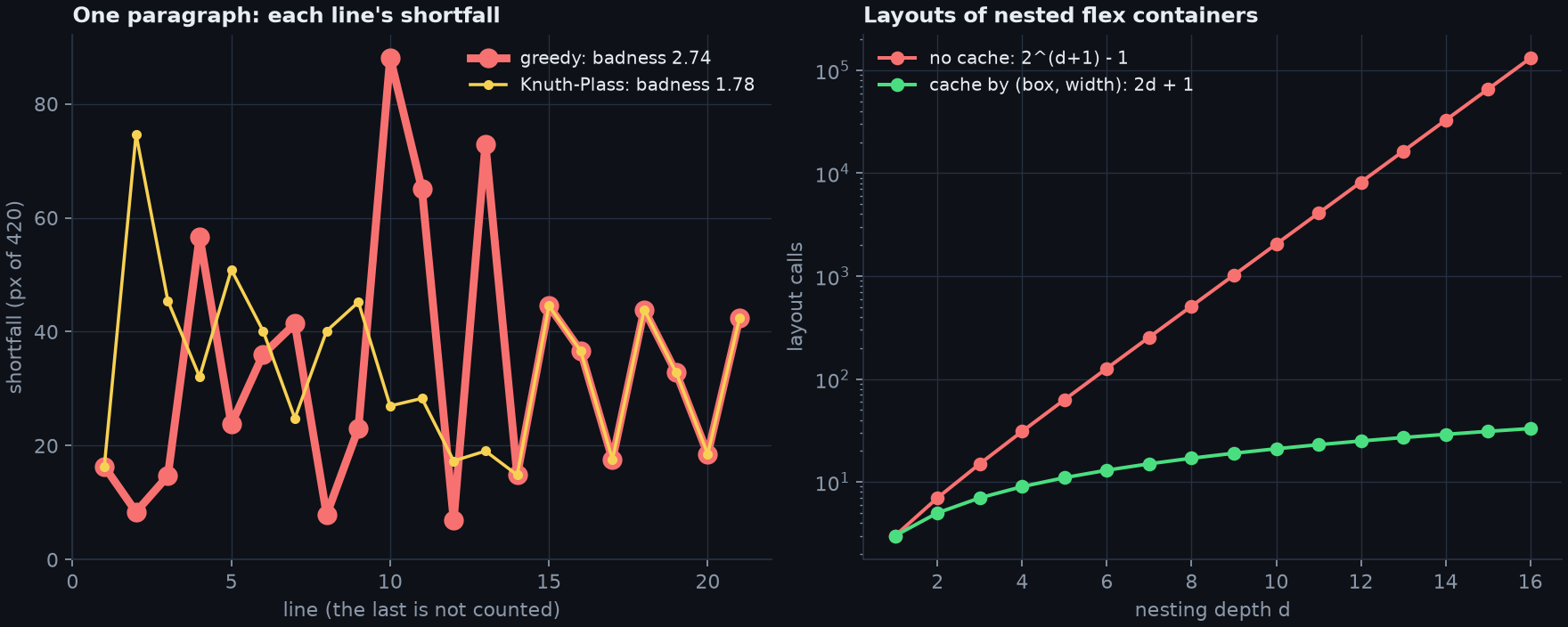
Lab 42 · Greedy against total-fit line breaking, checked by brute force
Break random paragraphs with the series' greedy and Knuth-Plass routines, check on short paragraphs that the dynamic program's badness is the least over all sets of breaks and that greedy uses the fewest lines, then count the layouts of nested flex containers and check two WCAG contrast ratios.
python -m videos.cs.labs 42
needs numpy, scipy, matplotlib · download lab42.py ·
source on GitHub20 paragraphs of 11 words Knuth-Plass optimal on 20 of 20 (6,807 feasible break sets tried); greedy optimal on 17
300 long paragraphs: badness, Knuth-Plass / greedy median 0.88; below 1 on 230, never above
worst line's shortfall, mean greedy 77.0 px Knuth-Plass 70.7 px
paragraphs where Knuth-Plass takes an extra line 0 of 300
nested flex, depth 16 131,071 layouts without a cache (2^17 - 1), 33 with one (2d + 1)
contrast black on white 21; lightest passing grey #767676 (4.54), #777777 fails (4.48)
Greedy minimizes the number of lines and nothing else; the dynamic program minimizes the whole paragraph's badness, and brute force confirms that no set of breaks does better.The code (108 lines; it asserts its own result)
"""Lab 42: break paragraphs greedily and by Knuth-Plass, check the dynamic program against every possible set of breaks, and count nested layouts."""

from videos.coursekit import labs  # noqa: I001  (must stay first: it lets explainer.cs import without manim)

import itertools

import numpy as np

from explainer.cs.web import layout as ly
from explainer.cs.web import platform as pf

TITLE = "Greedy against total-fit line breaking, checked by brute force"
GOAL = ("Break random paragraphs with the series' greedy and Knuth-Plass routines, check on short paragraphs that "
        "the dynamic program's badness is the least over all sets of breaks and that greedy uses the fewest lines, "
        "then count the layouts of nested flex containers and check two WCAG contrast ratios.")
TASKS = [
    "Change the cost in the brute-force check from the cube of the shortfall to its square, and count how many of the short paragraphs Knuth-Plass (which uses the cube) no longer breaks optimally.",
    "Narrow the line from 420 to 250 px and compare how often Knuth-Plass uses one line more than greedy. Why can it never use fewer?",
    "Call ly.flex(600, [(300, 1, 1), (300, 1, 3), (200, 0, 1)]) and check by hand that the shrunk sizes sum to 600 and that the third item gives up exactly as much as the first.",
]

LINE, SHORT, SPACE = 420.0, 230.0, 5.0


def badness(lines, widths, line):
    return ly.line_stats(lines, widths, SPACE, line)["badness"]


def every_breaking(widths, line):
    """Every way to cut the words into lines that fit."""
    n = len(widths)
    for mask in itertools.product((0, 1), repeat=n - 1):
        cuts = [0] + [i + 1 for i, m in enumerate(mask) if m] + [n]
        lines = [list(range(a, b)) for a, b in zip(cuts, cuts[1:])]
        if all(sum(widths[a:b]) + SPACE * (b - a - 1) <= line for a, b in zip(cuts, cuts[1:])):
            yield lines


def run(seed=0):
    rng = np.random.default_rng(seed)
    lab = labs.Lab()

    # 1. short paragraphs on a narrow line: every set of breaks, against the dynamic program and the greedy rule
    ties, tried = 0, 0
    for _ in range(20):
        widths = [float(w) for w in rng.uniform(25, 110, 11)]
        g, k = ly.greedy(None, widths, SPACE, SHORT), ly.knuth_plass(None, widths, SPACE, SHORT)
        allb = list(every_breaking(widths, SHORT))
        tried += len(allb)
        least = min(badness(b, widths, SHORT) for b in allb)
        assert abs(badness(k, widths, SHORT) - least) < 1e-9, "Knuth-Plass finds the least badness"
        assert len(g) == min(len(b) for b in allb), "greedy uses the fewest lines"
        ties += badness(g, widths, SHORT) - least < 1e-9
    lab.row("20 paragraphs of 11 words", f"Knuth-Plass optimal on 20 of 20 ({tried:,} feasible break sets tried); greedy optimal on {ties}")

    # 2. long paragraphs: how much better, and at what price in lines
    ratio, extra, worst_g, worst_k, shown = [], 0, [], [], None
    for _ in range(300):
        widths = [float(w) for w in rng.uniform(15, 95, int(rng.integers(60, 140)))]
        g, k = ly.greedy(None, widths, SPACE, LINE), ly.knuth_plass(None, widths, SPACE, LINE)
        sg, sk = ly.line_stats(g, widths, SPACE, LINE), ly.line_stats(k, widths, SPACE, LINE)
        assert sk["badness"] <= sg["badness"] + 1e-9 and sk["lines"] >= sg["lines"]
        ratio.append(sk["badness"] / sg["badness"])
        extra += sk["lines"] > sg["lines"]
        worst_g.append(sg["max_slack"])
        worst_k.append(sk["max_slack"])
        if shown is None and sk["lines"] == sg["lines"] and sk["badness"] < 0.7 * sg["badness"]:
            shown = (g, k, widths)
    ratio = np.array(ratio)
    assert np.median(ratio) < 0.97 and np.mean(ratio < 1 - 1e-9) > 0.6, "total fit is better on most paragraphs"
    assert np.mean(worst_k) < np.mean(worst_g)
    lab.row("300 long paragraphs: badness, Knuth-Plass / greedy", f"median {np.median(ratio):.2f}; below 1 on {int(np.sum(ratio < 1 - 1e-9))}, never above")
    lab.row("worst line's shortfall, mean", f"greedy {np.mean(worst_g):.1f} px   Knuth-Plass {np.mean(worst_k):.1f} px")
    lab.row("paragraphs where Knuth-Plass takes an extra line", f"{extra} of 300")

    # 3. nested intrinsic sizing: 2^(d+1) - 1 layouts without a cache, 2d + 1 with one
    depths = list(range(1, 17))
    naive = [ly.nested_measure(d, False) for d in depths]
    cached = [ly.nested_measure(d, True) for d in depths]
    assert naive == [2 ** (d + 1) - 1 for d in depths] and cached == [2 * d + 1 for d in depths]
    lab.row("nested flex, depth 16", f"{naive[-1]:,} layouts without a cache (2^17 - 1), {cached[-1]} with one (2d + 1)")

    # 4. flexbox conserves the container, and the contrast ratio's two landmarks
    sizes = ly.flex(600, [(300, 1, 1), (300, 1, 3), (200, 0, 1)])["sizes"]
    assert abs(sum(sizes) - 600) < 1e-9 and abs((300 - sizes[1]) - 3 * (300 - sizes[0])) < 1e-9
    assert abs(pf.contrast("#000000", "#ffffff") - 21) < 1e-9 and pf.grey_threshold() == "#767676"
    assert pf.contrast("#767676", "#ffffff") >= 4.5 > pf.contrast("#777777", "#ffffff")
    lab.row("contrast", f"black on white {pf.contrast('#000000', '#ffffff'):.0f}; lightest passing grey {pf.grey_threshold()} "
                        f"({pf.contrast('#767676', '#ffffff'):.2f}), #777777 fails ({pf.contrast('#777777', '#ffffff'):.2f})")
    lab.note = ("Greedy minimizes the number of lines and nothing else; the dynamic program minimizes the whole "
                "paragraph's badness, and brute force confirms that no set of breaks does better.")

    fig, ax = labs.figure(2, size=(11, 4.4))
    g, k, widths = shown
    for lines, color, name, lw, ms in ((g, labs.RED, "greedy", 4.0, 9), (k, labs.GOLD, "Knuth-Plass", 1.6, 4)):
        short = [LINE - sum(widths[i] for i in ln) - SPACE * (len(ln) - 1) for ln in lines[:-1]]
        ax[0].plot(range(1, len(short) + 1), short, "o-", color=color, lw=lw, ms=ms,
                   label=f"{name}: badness {badness(lines, widths, LINE):.2f}")
    ax[0].xaxis.get_major_locator().set_params(integer=True)
    ax[0].set(title="One paragraph: each line's shortfall", xlabel="line (the last is not counted)",
              ylabel="shortfall (px of 420)", ylim=(0, None))
    ax[0].legend()
    ax[1].semilogy(depths, naive, "o-", color=labs.RED, label="no cache: 2^(d+1) - 1")
    ax[1].semilogy(depths, cached, "o-", color=labs.GREEN, label="cache by (box, width): 2d + 1")
    ax[1].set(title="Layouts of nested flex containers", xlabel="nesting depth d", ylabel="layout calls")
    ax[1].legend()
    lab.fig = fig
    return lab
Now change it
- Change the cost in the brute-force check from the cube of the shortfall to its square, and count how many of the short paragraphs Knuth-Plass (which uses the cube) no longer breaks optimally.
- Narrow the line from 420 to 250 px and compare how often Knuth-Plass uses one line more than greedy. Why can it never use fewer?
- Call ly.flex(600, [(300, 1, 1), (300, 1, 3), (200, 0, 1)]) and check by hand that the shrunk sizes sum to 600 and that the third item gives up exactly as much as the first.
Problems, with solutions
Try each problem before opening its solution.
-
Specificity. Show that specificity is a total preorder on selectors, and give two selectors with equal specificity whose order in the stylesheet decides the style.
Solution
Specificity maps a selector to a triple (a, b, c) of counts of ids, of classes (and attributes and pseudo-classes), and of type selectors; triples are compared lexicographically, which is a total order on ℕ³. Pulled back to selectors it is reflexive, transitive and total, but not antisymmetric, since different selectors share a triple: a total preorder.
.note pandp.leadboth have (0, 1, 1); for<div class=note><p class=lead>both match, and the later rule in the stylesheet wins, which is why the cascade's last key is source order. -
Knuth–Plass. Prove that the dynamic program finds an optimal set of breaks in O(nw) time for n words and at most w words per line, and that greedy is optimal when only the number of lines counts.
Solution
Let best(j) be the least total cost of setting words 1..j with a break after j. A line ending at j starts after some break i < j, and the cost is additive over lines, so best(j) = min over feasible i of best(i) + cost(i, j): an optimal setting of 1..j ends with an optimal setting of 1..i (exchange argument). Feasible i are those whose line fits, at most w of them, so the table costs O(nw). For the number of lines: by induction, after k lines greedy has placed at least as many words as any setting does in k lines (greedy's k-th line starts no later, and then takes as many words as fit), so it never needs more lines.
-
Event-loop orderings. Give the output order of a program mixing
setTimeout, promises andawait, and justify each step from the event loop's rules.Solution
For
log("A"); setTimeout(() => log("B")); Promise.resolve().then(() => log("C")); log("D"): the script is one task and runs to completion, logging A and D; thethencallback was queued as a microtask and the timer as a task. After the task the microtask queue drains (C), and only then does the loop take the next task (B): A, D, C, B. An async function runs synchronously until its firstawait, and the rest of it is queued as a microtask, solog("before"); f(); log("after")withasync function f() { log("f starts"); await null; log("f resumes") }prints before, f starts, after, f resumes. -
Contrast. Derive the contrast ratio's range, 1 to 21, and find the lightest grey with ratio 4.5 on white.
Solution
Relative luminance L lies in [0, 1] (0 for black, 1 for white), and the ratio is (L₁ + 0.05)/(L₂ + 0.05) with L₁ ≥ L₂: at least 1 (equal colours) and at most 1.05/0.05 = 21. On white (L = 1) we need L ≤ 1.05/4.5 − 0.05 ≈ 0.1833. A grey v/255 has L equal to its linearised value; solving ((c + 0.055)/1.055)^2.4 ≤ 0.1833 gives c ≤ 0.4653, so v ≤ 118.7. The lightest integer grey is 118 = #767676, with ratio 4.54; #777777 gives 4.48 and fails.
-
Build. Add a flexbox container to our toy browser, and render a navigation bar that shrinks as the window narrows.
Solution
Solution sketch. Give
layoutadisplay: flexbranch: measure each child's basis as its max-content width (the sum of its word widths), callflex(container, items)to get the sizes, place the children left to right at those widths, and lay each child's text inside its own width; the line height of the bar is the tallest child's. Rendering the bar at 900, 600 and 400 px shows the grow and shrink cases; below the sum of the minimum (longest-word) widths, real flexbox overflows rather than shrinking further, and a complete answer clamps there. -
★ Research. Find a flex-layout algorithm with intrinsic sizing whose relayout cost is bounded by the size of the change, with a matching lower bound.
Discussion. Open. Engines cache layout results by (box, constraints), which makes a full layout linear in practice, but a change deep in a nested flex tree can change intrinsic sizes all the way up and the free space at every level on the way down. A good answer would define the size of a change (the boxes whose computed geometry differs), give an algorithm whose work is within a polylogarithmic factor of it, and prove that no algorithm can do asymptotically better on some family of pages; partial results for normal flow alone, or for flex without wrapping, would already be new.
Notes and sources
Glossary
- tokenizer, tree builder, open-element stack, adoption agency — the HTML parser's two stages; the elements open at the current point; the repair for misnested formatting.
- DOM, CSSOM, render tree — the document's tree; the stylesheets' object model; the styled tree layout uses.
- cascade, origin, specificity, inheritance — how a property's value is chosen among rules.
- box model, normal flow, block and inline boxes, line box — content, padding, border, margin; how boxes stack and flow.
- flexbox, flex basis, grow and shrink factors, grid, fr — one- and two-dimensional distributions of space.
- greedy (first-fit) and total-fit line breaking, badness — breaking each line as soon as it is full; minimizing a cost over the whole paragraph.
- paint, display list, layer, compositing, raster — drawing commands; independently drawn surfaces; combining them on the GPU; turning them into pixels.
- frame budget, jank, requestAnimationFrame — 16.7 ms at 60 Hz; missed frames; a callback before the next frame.
- event loop, task, microtask, run-to-completion — the browser's scheduler and its units of work.
- hidden class (shape, map), inline cache, deoptimization — an object layout shared by objects; a per-site cache of layouts; falling back from optimized code.
- virtual DOM, reconciliation, key, signal — a tree diffed to update the page; matching children; a reactive value with dependents.
- HTTP cache, max-age, ETag, 304, stale-while-revalidate, service worker — caching and revalidating responses; a script that intercepts a page's requests.
- critical rendering path, LCP, INP, CLS — what first paint waits for; Core Web Vitals.
- origin, same-origin policy, CORS, preflight, CSP, XSS, CSRF, SameSite — the browser's security boundaries and the attacks across them.
- site isolation, sandbox, WebAssembly — a process per site; confining a process; a portable compiled format.
- accessibility tree, ARIA, relative luminance, contrast ratio — what assistive technology reads; roles and states; the WCAG formulas.
- radio resource control (RRC) states, tail energy — a phone radio's power states; energy spent before idling.
Sources
- P. Panchekha and C. Harrelson, Web Browser Engineering (2025); I. Grigorik, High Performance Browser Networking (2013); T. Garsiel and P. Irish, "How Browsers Work" (2011).
- WHATWG, HTML Living Standard (§13.2, parsing; §8.1.7, event loops); W3C CSS Cascading and Inheritance Level 4, CSS Flexible Box Layout Level 1; WCAG 2.2 (2023).
- D. Knuth and M. Plass, "Breaking paragraphs into lines", Software: Practice and Experience 1981.
- K. Zhang and D. Shasha, "Simple fast algorithms for the editing distance between trees", SIAM J. Comput. 1989.
- L. Meyerovich and R. Bodík, "Fast and parallel webpage layout", WWW 2010; P. Panchekha and E. Torlak, "Automated reasoning for web page layout", OOPSLA 2016; P. Panchekha et al., "Verifying that web pages have accessible layout", PLDI 2018.
- D. Akhawe, A. Barth, P. Lam, J. Mitchell and D. Song, "Towards a formal foundation of web security", CSF 2010; A. Bohannon and B. Pierce, "Featherweight Firefox", WebApps 2010; D. Fett, R. Küsters and G. Schmitz, "A comprehensive formal security analysis of OAuth 2.0", CCS 2016; L. Veronese et al., "WebSpec", S&P 2023.
- J. Huang et al., "A close examination of performance and power characteristics of 4G LTE networks", MobiSys 2012.
- M. Kleppmann, A. Wiggins, P. van Hardenberg and M. McGranaghan, "Local-first software", Onward! 2019.
About this partfrom its README
Part 42 of a sixty-one-part course in computer science (see the series plan and the syllabus), the third part of Act VIII, Building Software. A browser is a parser that never rejects its input, a constraint solver, a GPU compositor, a JIT compiler and an operating system for untrusted code, held together by one event loop with a 16.7 ms deadline. We build the pieces small enough to read, and run them together as a toy browser that renders this series' own README.
The instruments are in explainer/cs/web/ (tested in tests/test_cs42_web.py):
html.py: a tokenizer written as a state machine with error recovery (character references decoded), and a tree builder with an open-element stack that closes<p>and<li>implicitly, ignores stray end tags and reopens misnested formatting (a simplified adoption agency); a Markdown converter for this repository's READMEs.css.py: selectors (tag, class, id, descendant), specificity as (a, b, c), the cascade with inheritance and inline styles, right-to-left matching with counted element tests, and a synthetic deep page.layout.py: block and inline layout with greedy line breaking, font fallback for CJK text and spacing taken from the source; Knuth–Plass line breaking by dynamic programming; the flexbox grow/shrink algorithm; nested intrinsic sizing with and without a cache; a PIL painter with real fonts;render_markdown, the whole browser.events.py: the HTML event loop (tasks, microtasks, rendering steps,requestAnimationFrame, async functions) as a small interpreter; a frame timeline with a long task, and the same work in chunks.js.py: hidden classes with transitions, inline caches (monomorphic, polymorphic, megamorphic), type feedback and deoptimization.vdom.py: a reconciler with React's heuristics (keyed and unkeyed), the fewest moves by a longest increasing subsequence, Zhang–Shasha tree edit distance, and signals as a dependency graph.platform.py: the WCAG contrast ratio from sRGB, origins and CORS decisions, an HTTP cache with revalidation and stale-while-revalidate, the critical rendering path, Cumulative Layout Shift, and an LTE radio-energy model.
Chapter notes
- Hook. What happens when you type a URL, layer by layer (Parts 30, 36, 37). Five machines in one program. Our toy browser's rendering of the README: 146 nodes, 23 blocks, 786 words.
- 1. Thirty years of the web. CERN 1989–91, Mosaic, Netscape, JavaScript in ten days, CSS, the browser wars, AJAX, Chrome and V8, WHATWG and the living standard.
- 2. Parsing HTML. The tokenizer as a state machine consuming
<p class=note>Hi <b>there</p>; six malformed inputs and the trees they become; why HTML is not parsed by a grammar; the open-element stack; the adoption agency. - 3. The cascade. Specificity as a lexicographic order; a cascade worked through, with inheritance; right-to-left matching: on a 2,000-element page of mean depth 21, ten selectors cost 34,193 element tests right to left against 118,685 left to right (on the shallow README the two are about equal); the render tree.
- 4. Layout. The box model and normal flow; flex items growing and shrinking; grid; greedy against Knuth–Plass on Darcy's letter in Pride and Prejudice (worst line 77.8 px short against 54.8; badness 2.40 against 1.86; better on 284 of 300 paragraphs, median ratio 0.68); the breakpoint graph of the novel's first sentence; incremental relayout (22 of 786 words re-broken).
- 5. Paint, layers and the frame. Display lists, layers and compositing; the 16.7 ms budget; a 120 ms task drops 7 frames, the same work in 8 ms chunks drops none.
- 6. The event loop. Tasks, microtasks and rendering; four orderings computed; async/await; run-to-completion; workers.
- 7. JavaScript engines. Tiers, hidden classes and inline caches (1, 1.5, 2.5 shape checks per access; a dictionary lookup every time when megamorphic); deoptimization at calls 5 and 9; generational GC.
- 8. UI frameworks. Tree edit distance against React's heuristics; keyed lists (prepend: 3 nodes touched against 103; swap two: React's pass moves 99 rows, the LIS 2); signals as a dependency graph.
- 9. Caches, offline and local-first. An HTTP cache over an afternoon; content-hashed assets; service workers; local-first software and CRDTs (Part 39).
- 10. Web performance. The critical rendering path (345 ms against 245 ms, illustrative); Core Web Vitals; CLS computed; compression measured; HTTP/2 and HTTP/3.
- 11. The security model. Origins, CORS decisions, an injected handler parsed by our parser, CSP, cookies and CSRF, site isolation after Spectre, WebAssembly.
- 12. Accessibility and mobile. The accessibility tree and ARIA; the WCAG contrast ratio derived (black on white 21; #767676 the lightest passing grey on white; this series' palette checked); radio power states: ten requests 20 s apart cost about 130 J against 16.5 J batched.
- 13. Our toy browser. Each stage on the README; block boxes and the painted page; each stage timed (about 150 ms in all in Python, against a 16.7 ms frame); what a real engine adds.
- 14. Frontier: layout, engines and proofs. Nested intrinsic sizing: 2,097,151 layouts at depth 20 without a cache, 41 with one; Cassius and VizAssert; parallel layout; the JIT as an attack surface; formal models of web security (Akhawe et al., Featherweight Firefox, the Web Infrastructure Model, WebSpec). Four open problems and the ★ research problem.
- Outro. Recap, payoffs, practice, problems, next part.
Companion material in this repository
The syllabus's plan for this partfrom SYLLABUS.md, the plan of record
- Hook: "what happens when you type a URL", answered layer by layer (callbacks to Parts 30, 36 and 37).
- History: Berners-Lee (1989–91), Mosaic (1993), JavaScript in ten days (1995), AJAX (2005), the living standard.
- HTML parsing: the tokenizer as a state machine with error recovery (callback to Part 12), and why HTML isn't parsed by a grammar; the tree builder; the DOM.
- CSS: the cascade; specificity as a lexicographic order (a, b, c); right-to-left selector matching, and why; inheritance.
- Layout:
- the box model and normal flow;
- flexbox as a constrained distribution of space (the grow/shrink algorithm on screen);
- grid;
- line breaking: greedy against Knuth–Plass dynamic programming (callback to Part 19);
- incremental relayout.
- Rendering: paint, layers, GPU compositing (callback to Part 51); the 16.7 ms frame budget; jank;
requestAnimationFrame. - The event loop: tasks, microtasks and rendering steps; run-to-completion; promises and async/await (callback to Part 33); why one long task freezes a page.
- JavaScript engines: lazy parsing, bytecode, inline caches and hidden classes, the optimizing JIT and deoptimization, generational GC (callbacks to Part 15).
- UI frameworks:
- the virtual DOM, and why React's O(n) heuristic diff replaces O(n³) tree edit distance (computed);
- keyed lists;
- fine-grained reactivity (signals) as a dependency graph (callback to Part 41).
- Client state: caches, service workers and offline; local-first software and CRDTs (callback to Part 39).
- Web performance: the critical rendering path; loading priorities; Core Web Vitals (LCP, INP, CLS); compression and images; HTTP/2 and HTTP/3 in practice (callback to Part 37).
- The browser security model: same-origin, CORS, CSP; process sandboxing and site isolation (Spectre, callback to Part 8); WebAssembly (callback to Part 15).
- Accessibility: the accessibility tree, ARIA, keyboard navigation; the WCAG contrast ratio, derived (Part 44).
- Mobile and native apps: the UI thread, frame deadlines, battery and radio power states (why batching requests saves energy, cited); cross-platform frameworks.
- Our toy browser: an HTML-subset parser, the cascade, block and inline layout, and Part 51's rasterizer, rendering a page of this repository's README. Outro.
Computed: the toy browser; specificity orderings; Knuth–Plass against greedy line breaking on a novel's paragraph; keyed against unkeyed list diffs; event-loop orderings; contrast ratios. Visuals: the tokenizer state machine consuming characters; the DOM and CSSOM merging into the render tree; flex items growing and shrinking; Knuth–Plass's breakpoint graph with the optimal path; a frame timeline where a long task causes jank. In practice: frontend and mobile engineering, web performance, accessibility, the engines behind Chrome, Firefox and Safari, React/Vue/Svelte. Reading: Panchekha & Harrelson, Web Browser Engineering; Grigorik, High Performance Browser Networking; Garsiel & Irish, "How Browsers Work"; the WHATWG HTML Living Standard (parsing) and the CSS specifications (cascade, flexbox); Knuth & Plass 1981; Haverbeke, Eloquent JavaScript; Flanagan, JavaScript: The Definitive Guide; WCAG 2.2.
中文讲义
本讲的中文部分(与英文版对应)。
习题与解答
-
特异性。 证明特异性是选择器上的一个全预序,并给出两个特异性相等、由样式表中的顺序决定样式的选择器。
解答
特异性把选择器映射到三元组 (a, b, c):id 的个数、类(以及属性和伪类)的个数、类型选择器的个数;三元组按字典序比较, 这是 ℕ³ 上的全序。拉回到选择器上,它是自反、传递且完全的,但不是反对称的,因为不同的选择器可以有同一个三元组:所以是全预序。
.note p和p.lead都是 (0, 1, 1);对<div class=note><p class=lead>两者都匹配,样式表中靠后的规则胜出,这正是层叠的最后 一个键是源顺序的原因。 -
Knuth–Plass。 证明这个动态规划在 O(nw) 时间内找到最优断行(n 个词,每行至多 w 个词),并证明只计行数时贪心是最优的。
解答
设 best(j) 为排好第 1..j 个词、且在 j 之后断行的最小总代价。以 j 结尾的一行从某个断点 i < j 之后开始,代价按行可加, 所以 best(j) = 对所有可行 i 取 best(i) + cost(i, j) 的最小值:1..j 的最优排法以 1..i 的最优排法结尾(交换论证)。可行的 i 是那些 使该行放得下的 i,至多 w 个,所以整张表的代价是 O(nw)。关于行数:归纳地,排完 k 行后,贪心放下的词至少和任何排法在 k 行里放下的 一样多(贪心的第 k 行开始得不更晚,然后放下尽可能多的词),所以它从不需要更多的行。
-
事件循环中的顺序。 给出一个混合
setTimeout、promise 和await的程序的输出顺序,并用事件循环的规则说明每一步。解答
对
log("A"); setTimeout(() => log("B")); Promise.resolve().then(() => log("C")); log("D"):脚本是一个任务,运行到底,输出 A 和 D;then的回调排进了微任务队列,定时器排进了任务队列。任务结束后先清空微任务队列(C),然后循环才取下一个任务(B): A、D、C、B。async 函数同步运行到它的第一个await,其余部分作为微任务排队,所以log("before"); f(); log("after"),其中async function f() { log("f starts"); await null; log("f resumes") },输出 before、f starts、after、f resumes。 -
对比度。 推导对比度的取值范围 1 到 21,并求出在白底上对比度为 4.5 的最浅灰色。
解答
相对亮度 L 在 [0, 1] 之间(黑为 0,白为 1),对比度为 (L₁ + 0.05)/(L₂ + 0.05),L₁ ≥ L₂:至少为 1(颜色相同),至多为 1.05/0.05 = 21。在白底(L = 1)上需要 L ≤ 1.05/4.5 − 0.05 ≈ 0.1833。灰色 v/255 的 L 等于它线性化后的值;解 ((c + 0.055)/1.055)^2.4 ≤ 0.1833 得 c ≤ 0.4653,即 v ≤ 118.7。最浅的整数灰度是 118 = #767676,对比度 4.54;#777777 为 4.48, 不达标。
-
动手。 给我们的玩具浏览器加上 flexbox 容器,渲染一个随窗口变窄而收缩的导航栏。
解答
解答要点。 给
layout加一个display: flex分支:把每个子元素的基础尺寸量为它的 max-content 宽度(各词宽度之和),调用flex(container, items)得到尺寸,按这些宽度从左到右放置子元素,并在各自宽度内排它们的文字;导航栏的行高取最高的子元素。 在 900、600 和 400 像素下渲染,可以看到伸展和收缩两种情形;当宽度小于各子元素最小(最长单词)宽度之和时,真正的 flexbox 会溢出 而不再收缩,完整的答案应在那里截断。 -
★ 研究。 求一个带固有尺寸的 flex 布局算法,其重新布局的代价受变化大小的约束,并给出相匹配的下界。
讨论。 尚未解决。引擎按(盒子,约束)缓存布局结果,使完整布局在实践中是线性的;但深层嵌套的 flex 树中的一处改动,可能一路向上 改变固有尺寸,再一路向下改变每一层的剩余空间。好的答案应定义变化的大小(计算出的几何发生改变的盒子),给出工作量在其多对数因子 之内的算法,并证明在某一族页面上没有算法能渐近地做得更好;仅对常规流,或仅对不换行的 flex 的部分结果,就已经是新的。
Build the film
python -m videos.cs.cs42.compute        # the part's numbers, into .cache/cs42
python tools/build.py cs42                  # render and assemble the film
EXPLAINER_TTS=silent python tools/qa_scene.py cs42 Hook   # one chapter, silent, with a contact sheet
Scenes: videos/cs/cs42. Setup: see the course page. Source of these notes: the README and the scenes' narration.
Build it
python -m videos.cs.cs42.compute
python -m unittest tests.test_cs42_web
python tools/build.py cs42